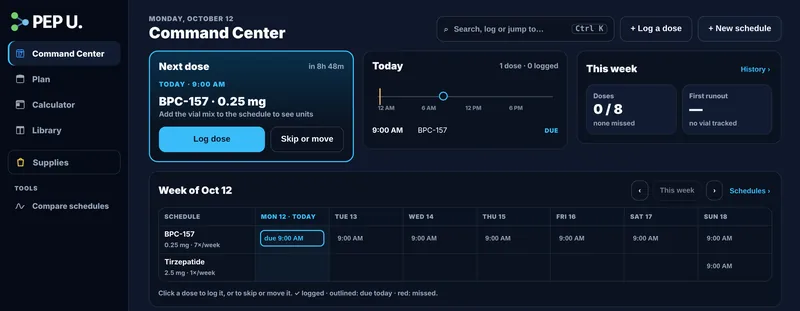
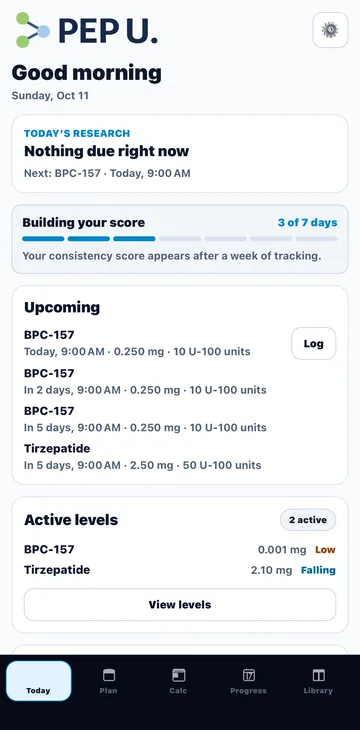
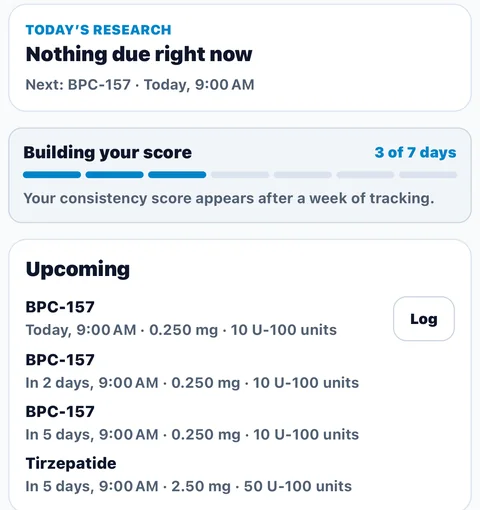
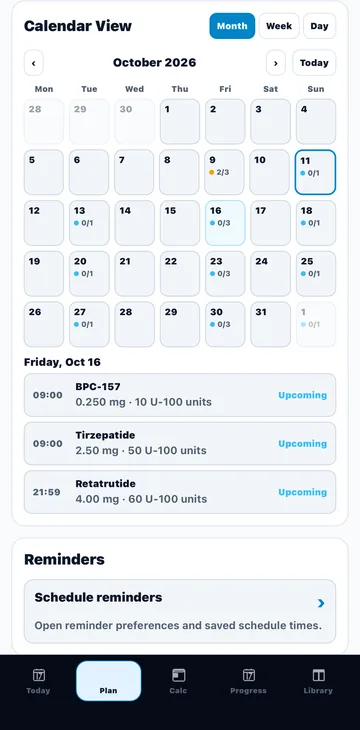
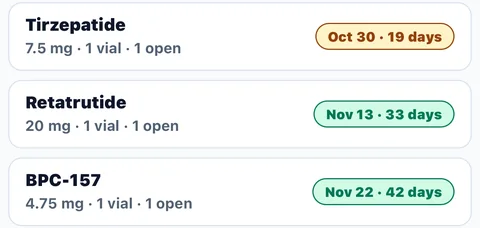
Where units come from — each plan’s dose for the day over how that plan’s vials are mixed (vial amount and water), the same on the web and in the app.
What was fixed — in the app, a vial reconstituted on another device could show units that rose every day for the same mg. If you recorded or drew by units recently, check those entries against the mg.
Units here — plans from your account now show units wherever the plan’s mix is known; a plan without one shows mg only.
✨
PeptideUniv on the web has a new look
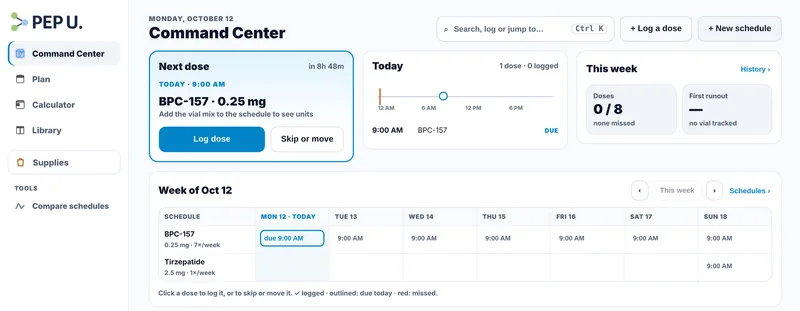
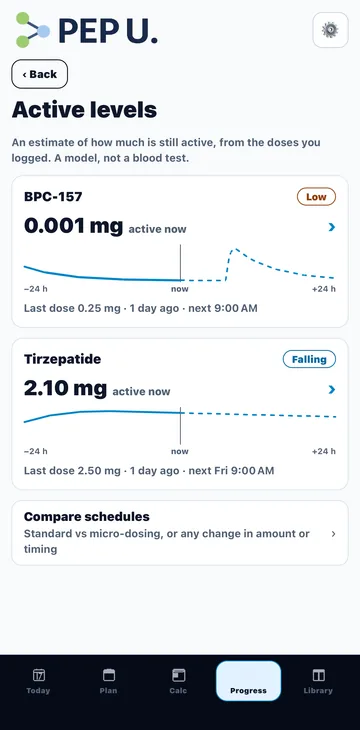
Command Center, one menu, Active levels and Compare schedules.
🔒
Cloud Backup and Transfer Keys have been retired
Your data here is unchanged — nothing on this browser was removed.
Why — a backup could be read or replaced by anyone who had this browser’s Transfer Key.
What to use instead — sign in to sync across devices and the app, or export a file to keep your own copy.
⚠️
Check the dose on these saved plans Correction
Plans saved from a schedule or the calculator in mcg used to keep the mcg number as mg (250 mcg saved as 250 mg). Where a plan matched its schedule, or the calculator's weekly total, exactly it has been corrected (to 0.25 mg). These did not match, so nothing in them was changed. Open each one and check its dose in mg is what you meant.
Peptide tracker · Web and Android · iPhone soon
Your peptide plan, organized.
Your schedule, vials, logged doses and the math — in one place. Know what’s due today, what’s left in each vial, and what you’ve already done.
References are for research and education, not personal instructions.
One account. Web and Android — iPhone soon.
Sign in once and your schedules, logs and vials follow you. An account is optional — without one, everything stays on this device.
Webpeptideuniv.com, with a full Command Center on a big screen.Open Pep U on the web
AndroidThe Pep U app, with reminders on your phone.
iPhone Coming soonThe Pep U iPhone app is on its way to the App Store. Until then, open peptideuniv.com in Safari and add it to your Home Screen — it signs in to the same account.
Pricing
Free to start. Pro when your plan grows.
The calculator, Today and your dose history are free. Pro adds reminders, unlimited schedules and the deeper views.
Free
$0forever
Reconstitution calculator (mL + units)
2 active schedules
Today, calendar and dose logging
Your dose history, in full
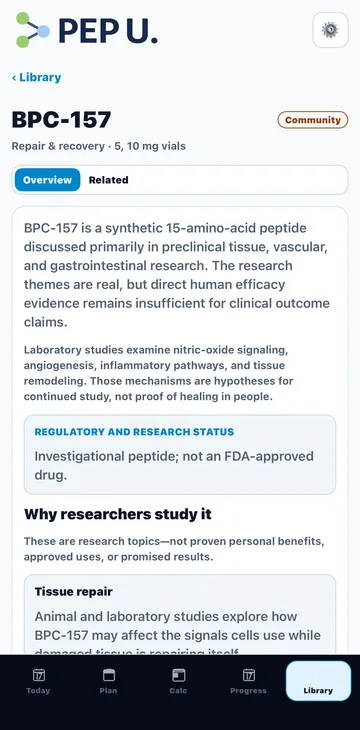
5 Library references: BPC-157, TB-500, GHK-Cu, Semaglutide and Tirzepatide
No account needed to start. After checkout, add a free Pep U account to use Pro in the app and on every browser.
Both plans start with a 7-day free trial. You’re charged when the trial ends unless you cancel before then. Renews automatically; cancel anytime and keep Pro until the end of the period you paid for. Signed in, Pro works on the web and in the Android app.
Already have Pro?
Questions
What is Pep U?
Pep U (PeptideUniv) is a tracker and reference for people who already have a peptide plan. It keeps your schedule, logged doses and vials together, does the arithmetic on the numbers you enter, and keeps cited research references nearby.
What can I do for free?
The calculator, up to 2 active schedules, Today and the calendar, dose logging and your dose history, 5 Library references, the education and safety guides, and account sync. No card and no account needed to start.
What does Pro add?
Unlimited schedules and stacks, reminders, active levels and Compare schedules, the consistency score, vial run-out dates, the full Library, and calendar and PDF exports. Both plans start with a 7-day free trial.
Does Pep U give medical advice?
No. Pep U is for research, education and record keeping. It does not diagnose, prescribe or recommend treatment. Talk to a qualified healthcare professional before acting on anything you track.
Where can I use it?
On the web at peptideuniv.com and in the Android app on Google Play. An iPhone app is coming soon to the App Store; until then, open peptideuniv.com in Safari and add it to your Home Screen.
Does my data sync between devices?
Yes, when you sign in. Your schedules, logged doses, injection sites, vials and Pro follow your account across browsers and the Android app. Without an account, everything stays on the device you’re using.
Can I cancel anytime?
Yes. Cancel from subscription management and you keep Pro until the end of the period you paid for. A subscription bought in the Android app is managed in Google Play.
What happens to my data?
Without an account it stays in your browser, and you can export it any time from Settings. With an account it’s stored so it can sync, and you can delete the account and its data from Settings. See the Privacy Policy for details.
What happens if I clear my browser?
Signed out, clearing site data removes what was saved in that browser — export first, or sign in so it’s kept with your account. Pro bought here comes back when you sign in with your checkout email or use Restore Pro.
Do the math once.Pep U remembers the rest.
Save your vial and dose as a schedule. Pep U shows what’s due today, logs what you took and keeps every number ready for next time.
This app is for educational/reference use only. It does not provide medical advice, diagnosis, or treatment.
Always verify dosing, sterility, and safety with a qualified professional.
Many peptides/protocols are discussed in a research context and may not be approved for use.
Any examples, schedules, and “stacks” are informational and not prescriptions.
You must acknowledge this disclaimer to continue using the app.
You can review this any time under Settings (⚙️).
Settings
Appearance
Theme
What’s new
The new website
A one-minute tour of the menu, the Command Center, Active levels and the Calculator.
Dashboard
Enable Dashboard
Your dose history is free. Streaks, consistency and levels are Pro.
Inventory Pro
This browser only — not your account's vials
Enable inventory tracking
Track remaining vial amount, subtract logged doses, and show a runout estimate on the dashboard.
Mark a vial as low
Highlight a vial on the dashboard below these dose or day thresholds. No notification is sent.
Runout forecast
Use scheduled future doses to estimate when a vial may run out.
Notifications ProComing Soon
Enable reminders
Turn on dosing and stack reminders.
Reminder time
Default time used when scheduling reminders.
Web notifications
Browser permission: —
Mobile notifications status
On iPhone/iPad, background notifications require installing this PWA to Home Screen.
N/A
Background Reminders Pro
Works even when the page is closed using browser push notifications. If unsupported, reminders will continue to work while the app is open.
Status: —
iOS note: background push works only when installed as a PWA (Add to Home Screen) and supported by iOS version.
Calendar & Export Coming Soon
Calendar export preferences
Choose default behavior for calendar exports.
Coming Soon
Default export range
How far ahead to export by default.
Reminder time used for exports
Time-of-day used when exporting events.
Subscription
Pro status
Your current subscription tier.
—
Manage subscription
View upgrade options.
Restore Pro Access
Bought Pro in another browser? Sign in, or restore with your checkout email.
Your Data
Cloud Backup has been retired
Cloud Backup and Transfer Keys were retired to protect your data. Everything on this browser is unchanged. Sign in to sync across devices, or Export a file to keep your own copy.
Export Data
Download all your data as a JSON file.
Import Data
Restore data from a previously exported JSON file.
PeptideUniv ("we", "our", or "us") operates the PeptideUniv application and website.
The native iOS/Android app and the PeptideUniv website currently handle data differently. The complete policy describes each surface separately.
Native app summary
Without an account, schedules, logs, inventory, notes, settings, and reminder preferences stay on the device. An optional account copies them to our servers so your devices and the website show the same data.
The app has no crash-reporting, advertising, or attribution SDK. It sends anonymous usage data (PostHog) that never includes what you enter. In the EU, EEA, UK, and Switzerland it is off until you allow it; elsewhere it is on until you turn it off in Settings → Privacy & Local Data.
Local storage is app-sandboxed but is not additionally encrypted by PeptideUniv.
User-initiated PDF exports are governed by the destination selected in the operating-system share sheet.
Website summary
The website may process browser identifiers, email, interaction events, reminder/push data, account sync data for signed-in users, and Stripe entitlement metadata depending on the features used.
Stripe processes website payments; PeptideUniv does not store full payment-card details.
Google Analytics and our own usage events are off in the EU, EEA, UK, and Switzerland until you allow them, and on elsewhere until you decline; change this with "Cookie & analytics settings" at the bottom of the page. Cloudflare Web Analytics (cookieless) runs for every visitor.
Read storage, third-party, security, retention, and deletion details:
Full Privacy Policy
Terms of Service
Last updated: July 16, 2026
By using PeptideUniv ("the App"), you agree to the following:
1. Not Medical Advice
PeptideUniv is a research organization, arithmetic-conversion, tracking, inventory, export, and educational-reference tool.
It does not diagnose, prescribe, select an amount, establish safety or efficacy, or provide personalized medical advice.
Confirm health-related decisions and any existing plan with an appropriately qualified healthcare professional.
2. Subscription Terms
The first native iOS/Android testing release does not offer paid subscriptions, trials, purchases, or restore purchases.
The website may separately offer paid features billed through Stripe.
Website billing and cancellation terms are presented during checkout and in the Stripe customer portal.
A website purchase does not imply native-app entitlement unless a later release explicitly says otherwise.
Both plans start with a 7-day free trial. Annual is the best value for ongoing research planning.
No account needed to start. After checkout, add a free Pep U account to use Pro in the app and on every browser.
Restore Pro Access
Pro bought without an account belongs to the browser it was bought in. To use it here, sign in with the email you subscribed with, or restore with your checkout email below.
You're signed in. Pro follows your account on every browser and in the app. How accounts work
Transfer Keys have been retired. A Transfer Key was a permanent password that anyone who saw it could use, so it no longer moves Pro or data. Sign in with your account, or restore with your checkout email.
Use a PeptideUniv account
Create an account, or sign in, with the email you subscribed with. Pro then follows you to every browser and the PeptideUniv app. How it works
Restore with your checkout email
Restore Pro using the email you used at checkout. We’ll send a 6‑digit code to that address (from support@peptideuniv.com).
Email restore does not create an account. Your data stays on your device.